AI actions with human approval in Odoo — how it works, with real logs
ⓘ About this article & how it was made
Every governed AI action in Odoo has five beats: the ask in plain language, the read under the asker's own permissions, the draft built as a real record, the hold — a state the system enforces, not a politeness the model performs — and the human decision, with one audit row either way. The tell that separates real governance from theater: the refusal path leaves the same quality of evidence as the approval path.
Every vendor in this category says "human in the loop." The phrase costs nothing, which is why I want to show you the loop instead: the actual sequence, screen by screen, of an AI preparing a real action in Odoo and a person deciding whether it happens. I lead QA on Odient, which means my team walks this exact path before every release — the approve path, the refuse path, and the paths in between that marketing pages never mention. This piece is the walkthrough, with our screenshots and our logs.
#The five beats of a governed action
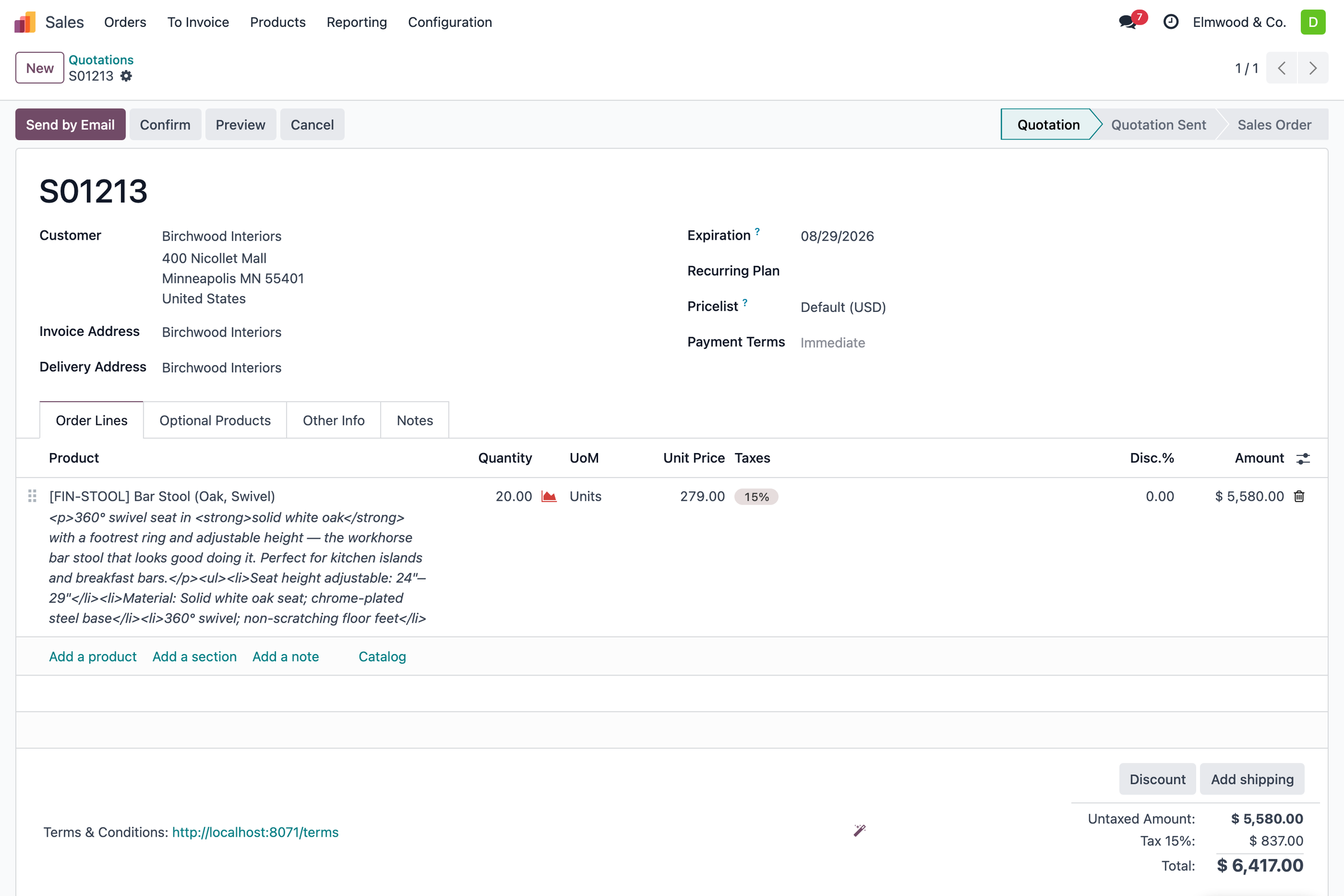
Strip away the framing and every approval-gated AI action has the same anatomy. The ask: someone requests work in plain language — "draft the quote for Birchwood, twenty bar stools." The read: the AI pulls what it needs from live records, under that person's own permissions. The draft: the work product gets built — a real quotation in the real pipeline, not a suggestion in a chat window. The hold: and then it stops. The draft sits in its normal Odoo state, unsent, flagged as waiting. The decision: a person approves, and only then does anything leave the building — or declines, and the draft dies. In Odient, either way writes one audit row — who asked, what ran, how it ended — into the trail shown below.
#What the hold actually is — and is not
This is where products differ, and where my team spends its testing time. A real hold is a state the system enforces, not a politeness the model performs. The distinction shows up in three places.
First, the draft must be inert by construction: whatever the model outputs, the send/post/confirm step is a separate, human-triggered operation. If a clever prompt could talk the system into skipping the hold, it is not a hold — which is exactly why injection screening sits in the request path before anything else runs.
Second, the policy must be configurable per action, not global. "Everything needs approval" sounds safe and dies in week two, when the team drowns in approvals for harmless reads. The workable shape is a write policy: this action runs freely, this one needs a person, this one is forbidden, this amount is over the cap so it waits regardless — the same structure the governance playbook derives from the frameworks.
Third — the part I test hardest — the refusal path must leave the same quality of evidence as the approval path. Ask the assistant for a record you are not cleared to see, and the correct behavior is a stop plus a log row, sitting in the same trail as the work that went through. My team tests the decline paths hardest of all; the refusals are where trust is actually earned.
#Reading the log like an auditor
The audit trail is the artifact that makes the rest verifiable, so here is how to read one — using ours.
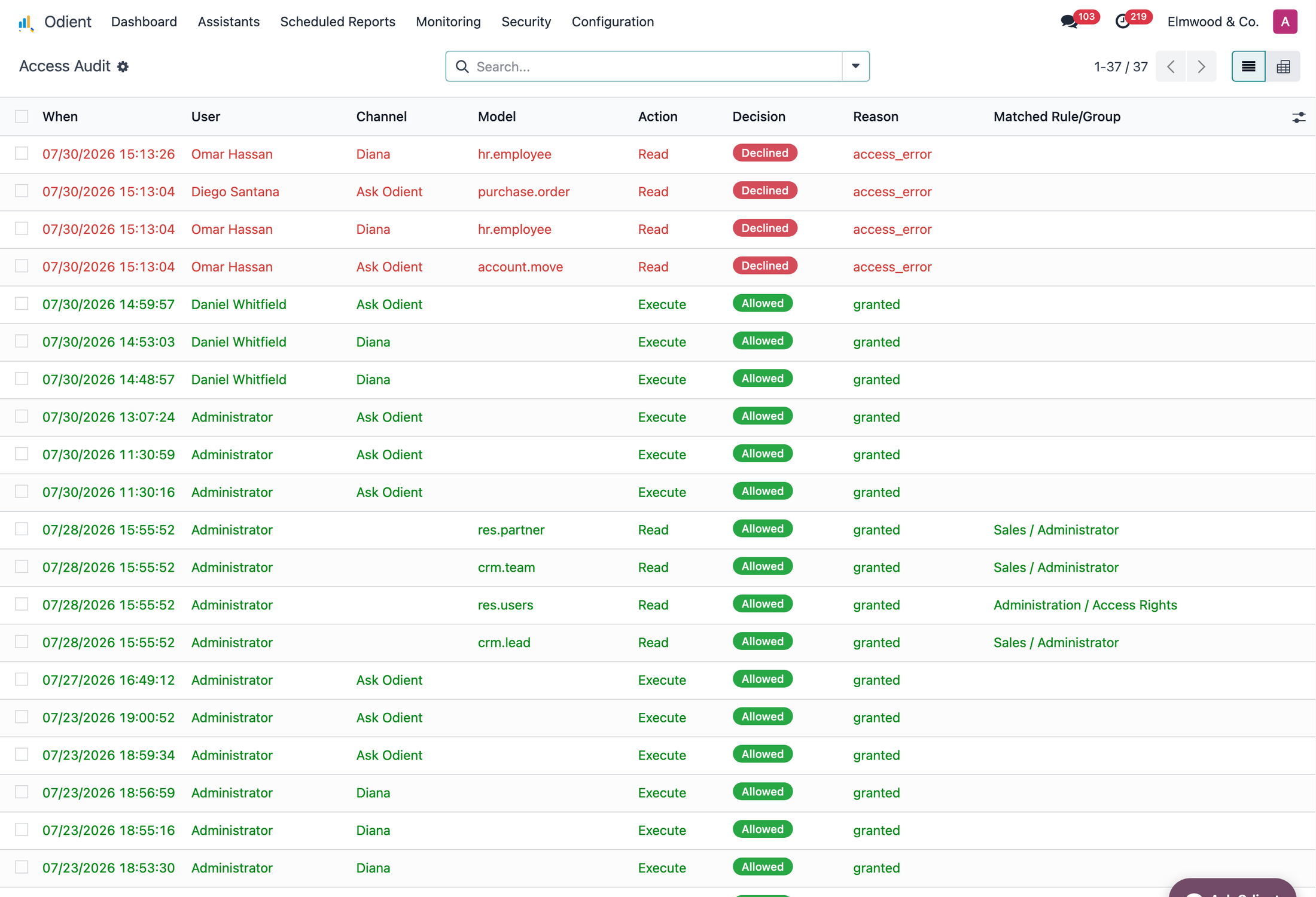
Each row: a timestamp, the person (or the agent acting for them), the channel the request came through, the model and action touched, and the decision — allowed, declined, or held-then-approved — with the rule that decided it. Two things to check in any product's log, ours included: that declined rows exist at all (a trail with only successes is a brochure), and that every row ties to a named person rather than a service account. When my team signs off a release, those two checks are the sign-off.
#Try the walk yourself
The five beats above are demonstrable in half an hour: ask for a draft, watch it hold, approve it, then deliberately ask for something out of scope and go find the refusal in the log. That last step is the one to insist on in any vendor demo — our own demo ends there on purpose. The full control set behind the hold — the gates, caps, limits and dry-run — is enumerated on the security page.
#Frequently asked questions
Does approval-gated AI slow the team down?
Approvals are for writes that matter, not for everything. A sane policy lets reads and low-risk drafts flow, holds sends and postings, and caps amounts — so the human minute lands exactly where a human minute was always going to be spent: on the decision.
What happens if the AI is asked for something the user cannot access?
It must refuse — and the refusal must be logged like any other decision. In Odient the assistant runs under the asking person's own permissions, so the scope question is settled by your existing Odoo access rights, not by a parallel permission system.
Can we start read-only and add actions later?
Yes, and it is the rollout we see work: read-only until the answers earn trust, then low-risk drafts, then the full write policy. The gate makes that a configuration journey rather than a re-purchase.
Sonam leads quality on Odient. Her team writes the tests that decide whether a feature ships — and the holdout tests nobody is allowed to edit.